1. 간단한 컴포넌트 및 레시피 작성
- 커스텀 컴포넌트와 커스텀 레시피 작성
- prerequisite: 당연히 component, recipe는 layer 하위에 있어야함. 따라서 custom layer가 있거나 만듦
- Custom layer 생성참고
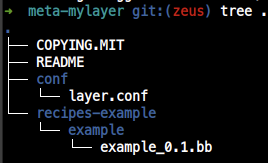
- Custom Layer file tree
1.1 컴포넌트 src local 관리
- Custom Layer file tree

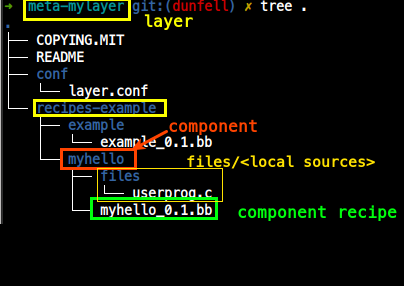
- Layer: meta-mylayer
- Custom Component: myhello (meta-mylayer/recipes-example/myhello)
- Custom Component recipe file: myhello_0.1.bb (meta-mylayer/recipes-example/myhello/myhello_0.1.bb)
- Component Source files: userprog.c (meta-mylayer/recipes-example/myhello/files/userprog.c)
1.2 myhello_0.1.bb
- 컴포넌트 myhello용 레시피 myhello_0.1.bb 작성
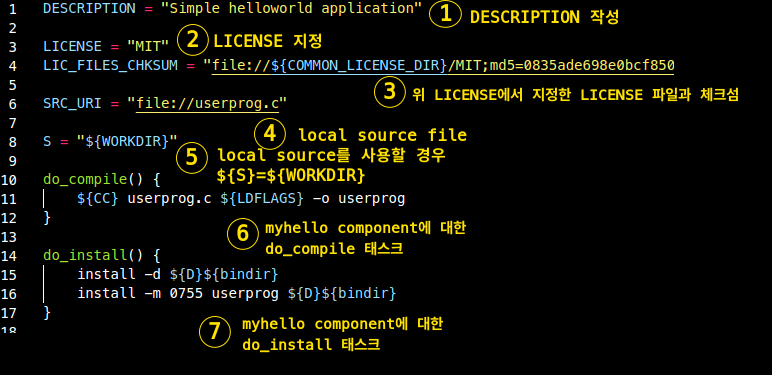
- SRC_URI = "file://userprog.c"
컴포넌트 소스가 로컬 파일 시, ${S}= ${WORKDIR}
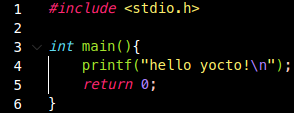
1.3 files/userprog.c
1.4 $ bitbake 'component'
- bitbake 명령으로 component를 빌드해보자.
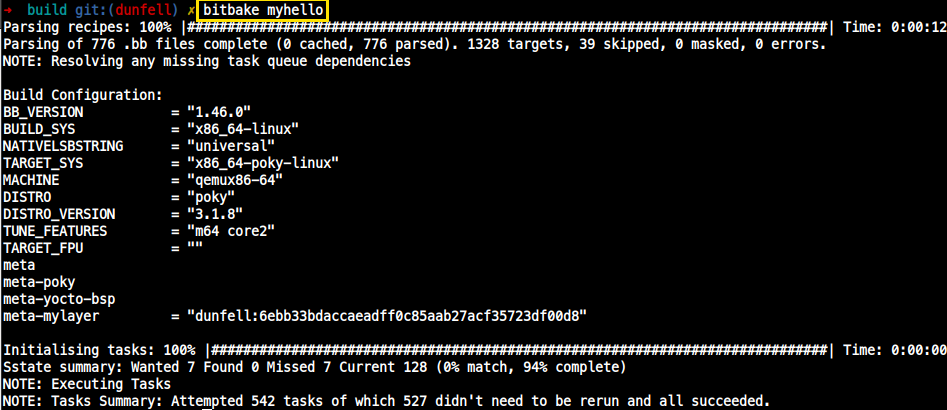
$ bitbake <Component Name>

e.g.,
$ bitbake myhello
- 컴포넌트 빌드 성공 -> 이미지에 넣으려면 Image recipe에 이 컴포넌트를 추가해야함
- 이미지에 이 컴포넌트를 넣으려면

2. Makefile 이용하기
- 위에선 컴포넌트 레시피.bb에서 do_compile() TASK 안에서 직접 컴파일 명령을 내렸는데, 이번엔 따로 Makefile을 만들어 이를 이용해 컴파일해본다.
- component/files의 파일 들

- Makefile 작성
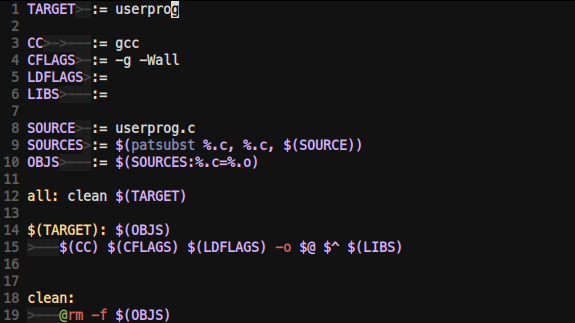
- myhello_0.3.bb(컴포넌트用 레시피) 에서
2-1. SRC_RUI = Makefile 위치
2-2. do_compile() task에는 Makefile 명령어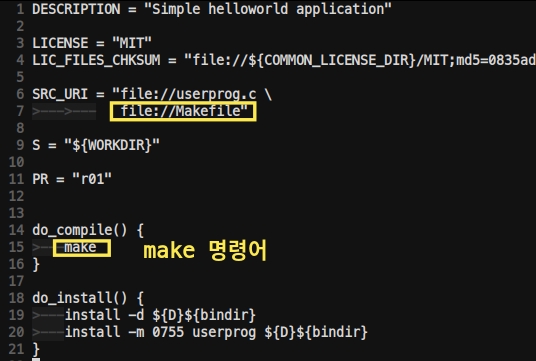
주의!! 이렇게 직접 make 명령어를 내리는 것은 좋지 않다!!
OE환경에서는 oe_runmake 대신 make를 직접 call하는 것은 좋지 않음
2-3. 그냥 oe_runmake를 믿기로 하고 do_compile() task를 없애자
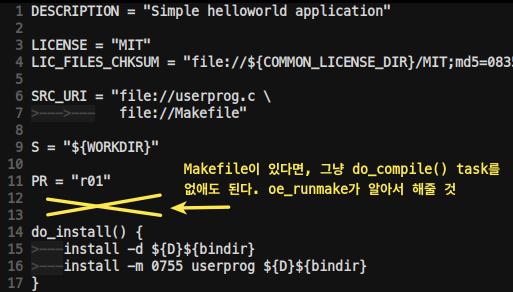
- $ bitbake로 빌드
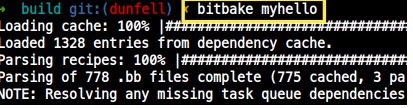
- ${WORKDIR}/temp에서 로그를보자

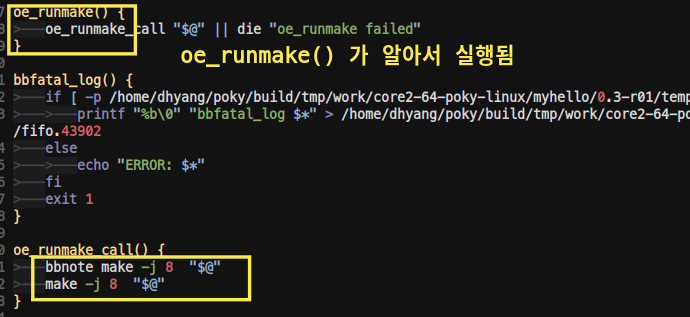
- 추가적인 oe_runmake에 관해서는 이 글의 oe_runmake 탭 확인
3. patch
3.1 patch
- component_directory/files/source를 일일히 수정하는 것으로는 bitbake가 알아먹지 못하기에, component_directory/files/source를 수정 후, local commit.
- $ git format-patch -1 = 0001-My-First-Patch.patch(커밋 메시지로 이름 지어지음)
- 0001-My-First-Patch.patch => component_directory/files로 MV
- 컴포넌트 레시피에 SRC_URI = file://0001-My-First-Patch.patch 추가
굉장히 짜증나는 일이니까, source는 따로 git으로 관리해 아래처럼, remote git repository를 활용하자.
3.2 컴포넌트 src git으로 관리
- 당연히 매우 다수의 컴포넌트들은 git으로 관리된다.
local로 관리하고 patch하고.. 너무 힘듬
- 특정 repository를 사용한다

- bitbake build
$ bitbake myhello- Image 생성
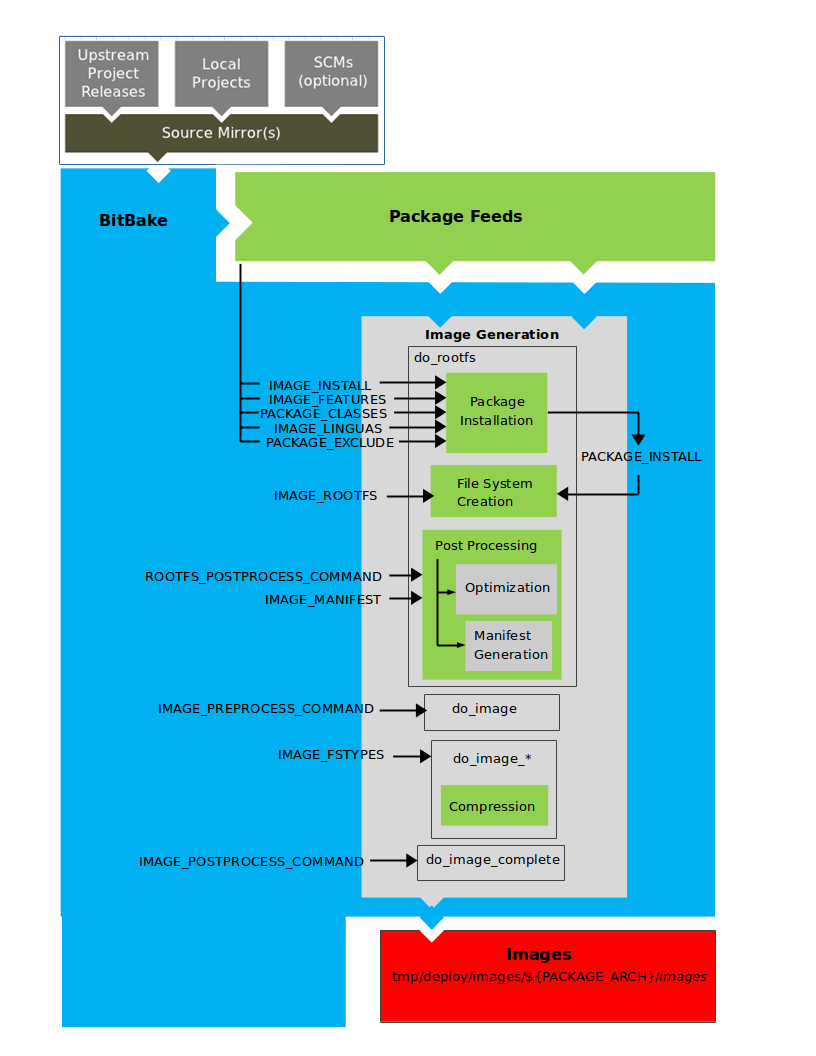
- IMAGE_INSTALL: 우리가 만든 Package 모음(Package Feeds area)에서 이미지에 포함시킬 패키지를 리스트업한다.
- PACKAGE_EXCLUDE: 설치되지 말아야할 것들을 리스트업 한다.
- PACKAGE_CLASSES: 사용할 패키지들의 종류(rpm, deb, ipk)를 선택한다.
- PACKAGE_INSTALL: 이미지에 설치할 최종 패키지 리스
- do_image
- do_image_*를 통해 Filesystem마다 다른식으로 이미지를 만들 수 있도록 한다.
4. One-Component, Multiple-recipes
- 1개 컴포넌트에서 다수의 레시피를 사용하는 예는 아주 많지만 (python, qt)..
- openembedded-core/meta/recipes-devtools/python을 예로 든다.
- component: python

- Yocto 에서는 하나의 레시피 단위로 접근 및 산출물을 만들어 낸다.
$ bitbake python3 -> work/<arch>/python3
$ bitbake python3-pip -> work/<arch>/python3-pip
- 따라서 공통 되는 내용이 많다면, .inc 파일을 만들고, 각 레시피에서 require 하자.
# <layer>/recipes-A/A/A-component.bb
require <recipes-A>/A/A.inc

# Insert Command
'Yocto Project : : Open Source' 카테고리의 다른 글
| libary 생성 레시피 작성 (0) | 2024.06.01 |
|---|---|
| pciutils를 수동 빌드 해보자. recipe vs 매뉴얼 빌드 (0) | 2024.06.01 |
| IMAGE_FEATURE: package-management (0) | 2024.06.01 |
| packagegroup (0) | 2024.06.01 |
| 패키지 구성 내용: package (ipk) advanced, (pre|post)inst, (pre|post)rm (0) | 2024.06.01 |